As soon as ChatGPT was released (and actually a little before that) I knew that Generative AI would have an impact on a lot of the writing we do in education, from student work to teacher administration. In January 2023 I published the original Practical Strategies for ChatGPT in Education post, recommending six areas to focus teacher use of GenAI: planning, refreshing, improvising, personalising, collaborating and communicating. Since then, there have been some significant advances and it’s time to update those original ideas.
The prompts used in the Practical Strategies post have been updated over time and work well across most GenAI text-based platforms such as ChatGPT, Microsoft Copilot, and Google Gemini. I’ve also released the entire series of prompts as a free online 4-week email course:
But the technology now extends well beyond text-based input and output. Multimodal GenAI makes use of image recognition and generation, text-to-speech and speech-to-text, code generation and execution, and more, and I’ve been experimenting with different approaches to using these technologies for lesson planning.
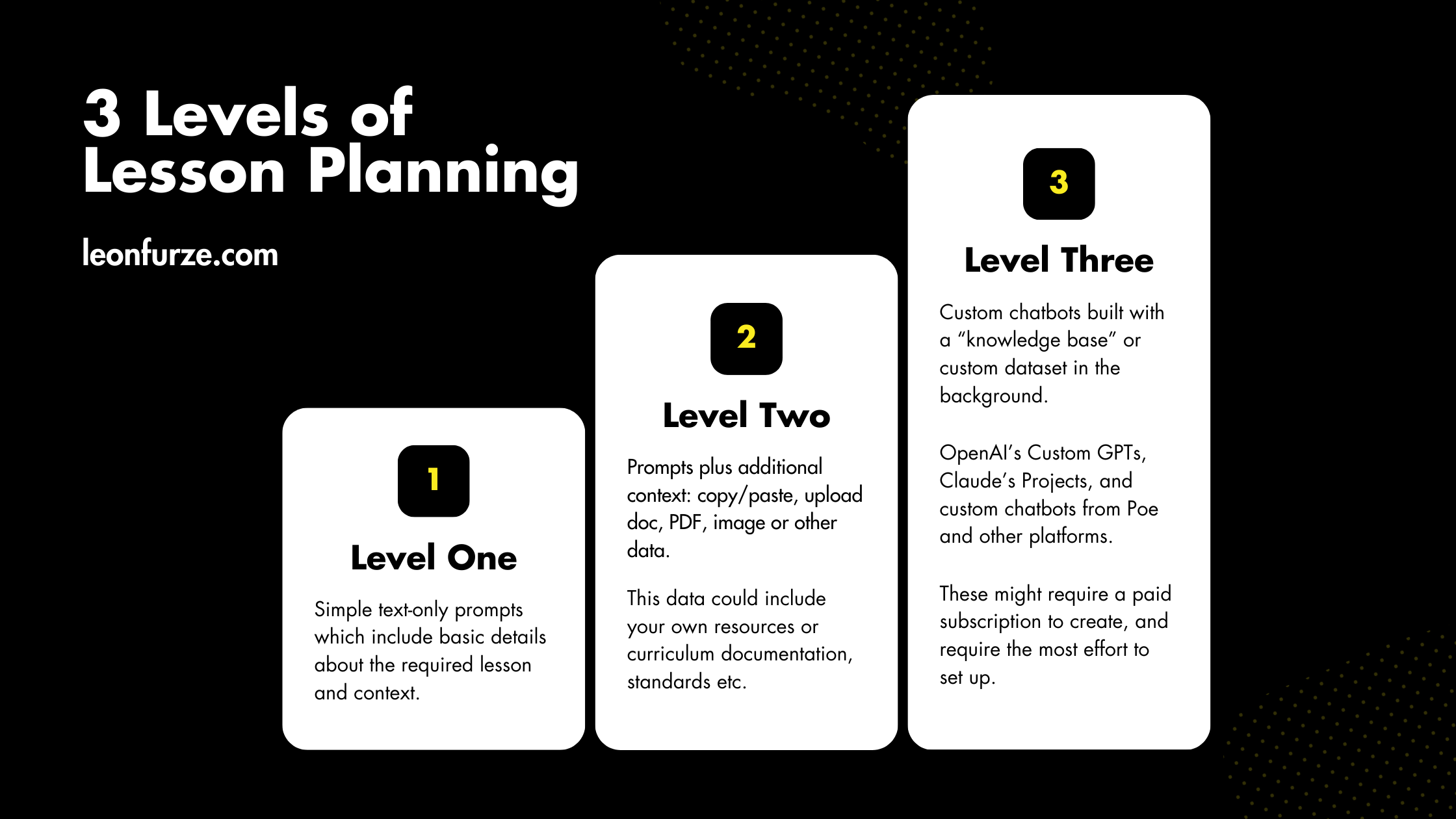
I’ve ordered these experiments into three levels, ranging from the simple Practical Strategies prompts, through file uploads, and onto custom GPTs and projects.

Level 1: Basic Prompts
At this level, you’re using a simple AI chatbot like ChatGPT with straightforward prompts. Even at this first level, avoid using very basic prompts like “write a lesson plan on X”. You’ll always get very generic output.
Because of the way these language models work, the output from such a simple prompt will be predictable, generic, and most likely aligned to a US curriculum – fine if you’re in the US, not so much for everyone else.
Instead, provide specific details:
- Topic and focus (e.g., “duality of humans and technology in Frankenstein”)
- Duration (e.g., 60 minutes)
- Year level and curriculum context (e.g., Year 12 VCE English)
Remember, the AI won’t truly understand your curriculum. It’s just pattern matching based on your prompt. Generative AI also has no understanding of pedagogy or the realities of the classroom. You’ll see lesson plans which recommend “10 minute starter activities” that any experienced teacher can tell you would actually take half an hour, or fail spectacularly…
Use this kind of prompt when you want a fast, basic idea to build on, for example if you’re in a faculty meeting kicking around some initial ideas for a brand new unit of work. Keep any eye out for any subtle (or unsubtle) biases in the output, including cultural, linguistic, racial, or gender biases. You’ll also need a level of professional understanding to avoid some of the educational myths that language models like to regurgitate, like “learning styles”.

Level 2: Adding Context
To get even more relevant results, you’ll need to provide additional context. When I wrote the original post on ChatGPT prompts that meant copy/pasting a limited amount of text into the prompt itself. Since then, a couple of things have changed:
- The “context window” of models has increased, meaning they can accept much more text as part of the prompt. You can now comfortably include a thousand words or more as part of the prompt in models like GPT-4o, Gemini, and Claude.
- Many applications, including free ones, now have the capacity to accept file uploads in various formats. That means you can upload Word documents, spreadsheets, PDFs, PowerPoints and images. These are converted to plain text and incorporated into the context window.
- GPT-4o, Claude, and Gemini have all added image recognition, meaning your prompts can also include images and photos of handwritten text – accuracy varies, but is constantly improving.
Adding additional context is not only a good way to anchor the lesson plan to your curriculum. You should also experiment with uploading other lesson resources you or your faculty have created as exemplar materials. For example, if your organisation follows a particular instructional method, you could upload some sample materials from another unit of work to guide the output of the model. Here are a few ideas:
- Copy and paste relevant curriculum documents (e.g., key knowledge and skills from your study design)
- Upload your own resources (lesson plans, worksheets, etc.)
- Still specify exactly what you want for more specific output (e.g., “a single 50-minute lesson aligned to these outcomes…”)

Level 3: Custom Chatbots and Projects
For the most sophisticated results, consider using a tool like Claude Projects or a Custom GPT from OpenAI. Creating these custom chatbots generally requires a paid subscription to the service (typically $20 USD/mth). You might therefore have a single account for the faculty leader, or a member of the faculty who uses GenAI enough to justify the cost.
This is obviously more complex than just dragging and dropping files into ChatGPT. Having experimented with both, I prefer Claude’s Projects because it adheres more closely to the uploaded materials, and the output is more sophisticated and accurate than a Custom GPT. Here’s how it works:
- Upload multiple resources to create a knowledge base (past lessons, examples, curriculum documents)
- Provide detailed context about your role and teaching approach
- Use specific prompts within this context
This method produces more comprehensive, tailored lesson plans anchored to your materials and methodology. you can also use some of the more advanced features of a model like Claude 3.5 Sonnet to create impressive resources, like an interactive unit plan which can be embedded directly in a Learning Management System like Canvas.
Check out the video below for examples of all three levels, including a detailed walkthrough of Claude’s “Project” approach.
Taking it Further
As you can see in the video, beyond generating simple lesson plans you can get pretty creative with these more advanced models, for example:
- Ask the AI to sequence multiple lessons
- Generate HTML code for your learning management system
- Create longer-term unit plans
Remember, the goal isn’t to replace your expertise, but to augment it. Use these tools to streamline your planning process, freeing up time for the aspects of teaching that truly require human insight and interaction.

As always, approach AI-generated content critically. Review and adapt the outputs to ensure they truly meet your students’ needs and align with your teaching philosophy.

The Practical AI Strategies online course is available now! Over 4 hours of content split into 10-20 minute lessons, covering 6 key areas of Generative AI. You’ll learn how GenAI works, how to prompt text, image, and other models, and the ethical implications of this complex technology. You will also learn how to adapt education and assessment practices to deal with GenAI. This course has been designed for K-12 and Higher Education, and is available now.
Want to learn more about GenAI professional development and advisory services, or just have questions or comments? Get in touch:


Leave a Reply